Results for "Wordpress"
Why I Would NEVER Recommend WordPress.Com For Blogging?
 wordpress.org vs wordpress.com

When someone is new in this field it becomes difficult for him to figure out which one is a better choice among  Self-Hosted WordPress.org and WordPress.com. This article is all about these two types of WordPress. I will list all the advantages and disadvantages of using them. At the end it will be decided that which one is a better choice.

As shown in the image the two WordPress are brothers. We have to find the better among them.

AH 010: Why Hassam Would NEVER Recommend WordPress.Com For Blogging?


WordPress.org - What Makes It The Leader?

In this service you have your own domain name and you have full control over your site.

Pros

  • It is free of cost.
  • It is easy to use so anyone can use it.
  • You have your own site so anyone else can't turn it off. You, yourself are responsible for your data so you site can only be turned down if you are doing something that is illegal.
  • You have full rights to upload your own plugins and use them.
  • You an apply themes of your choice. You can also edit their files.
  • You will earn money with ads you want to be seen on your site.

Cons

  • You will need a web hosting service for your site. It costs between $3 to $7.
  • You will have to update the WordPress manually. But it is not a very tough thing.
  • You will need to store backups for your site in case anything goes wrong. But backup services are easily available.
  • You will have to handle scams but you can enable Akismet to stop them.
wordpress.com the free version of wordpress

WordPress.com

It this service everything is controlled by someone else and you have to blog according to certain limitations.

wordpress.com pros and cons

Pros

  • You can use 3GB of space for free. But if your site expands you will have to choose a package for getting extra space which is costly.
  • You site will automatically be backed up.

Cons

  • Some ads will be placed on your site. You will have to face them until you are using free service. You will have to pay them to get rid of these ads.
  • You will have to get 25,000 page views monthly to place your own ads on your site.
  • You are not allowed to use plugins until you are using free service. Only VIP members are allowed to use plugins and they pay them $3750 per month.
  • You can't use you own made themes. What you can do is to change the colors and that costs $30 per year.
  • You will have to use their analytic tools.
  • They have full right to delete your site if they want to.
  • They can also change your theme according to their choice.

Which one is a Better Choice?

If you are making a site for your own self then yous should go with WordPress.com. It is the best for you as it doesn't cost any money and you don't have to get a lot of features. But if you want to earn some money with the help of your blog, you have to choose WordPress.org. It will cost you money. You will have to invest in the starting but them you will get the cost from your blog itself.

If you use WordPress.com you will not get the required features in your site even if you are paying them enough.

You may like to read

Now if you have decided to use WordPress.org you should use Bluehost. Its package includes web hosting service along with a domain name. It will cost you $3.95 per month.

Recommendation

There is no doubt, that I would never recommend using free version of WordPress, which is WordPress.com. Checkout the video above if you haven't yet. I go into that all in detail.

Hope this helps you out in making a decision.

Featureso Sunday, 28 February 2016
Genesis VS Thesis � Which Theme Framework Is The Future?

Genesis Or Thesis! This is the ultimate smack down between the two best Wordpress theme frameworks around!

 If you've a started a WordPress blog, the first thing you'd want to do is to choose a professional template. You've two options to proceed. Either you could install a standalone template. There are thousands of WordPress templates around. Free ones and premium ones on Themeforest too.

Though what many experts recommend is to make use of the amazing theme frameworks for WordPress that makes life a lot easier for any WordPress user. You would ask why so? Well, this post is all about letting you know more about these awesome WordPress theme frameworks and why I believe, Genesis theme framework for WordPress is taking over the market.

Why Thesis Died?


When Thesis theme framework was launched for WordPress in around 2006 or even before that, it took the Industry by storm. It wasn't that easy to customize any WordPress theme so easily. With the theme editor, you could simply customize any particular section of the theme you wished for.

thesis theme editor

Thesis was coming up with new updates and improved 'everything' until it the all controversial update 2.0

Epic Fail At 1.x To 2.0 Thesis Migration


After Thesis rolled out 2.0 update, it was quite an overall of the platform and it didn't had any considerable mechanism for the older version users to port their blogs current themes to the new 2.0 version.

That really turned off all the fans and soon we had another awesome competitor in the market, Genesis Theme Framework!

thesis themeframe work dying

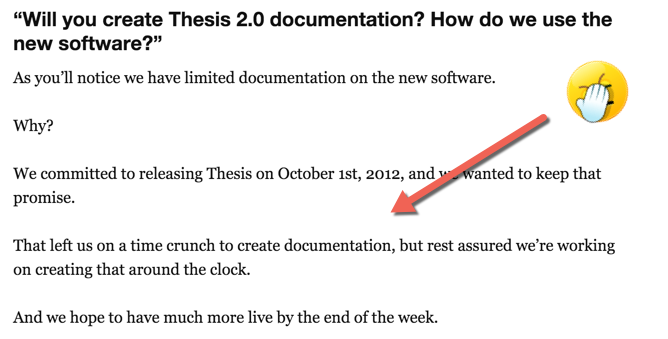
Thesis actually sucked at two things! Their documentation lacked a lot, specially after introducing Thesis 2.0. As per their team, they couldn't keep up with the work load and they understand that their documentation is lacking behind user's expectations.

poor thesis documentation

Switching Over Of Matt Cuts


Matt cuts, heads of Google web spam team switched over to Genesis framework and soon after people started to wonder what could make him possibly do that? Was there any superiority that Genesis had over Thesis framework in terms of search engine optimization?

Difficultly Level


With Genesis, any beginner who doesn't have prior knowledge of programming or coding can get started. There a bunch of child themes available and there is absolutely no need to hire a developer to manage your theme.

Thesis definitely scared people when they had to know template specific programming functions to make changes to the theme. Thesis is a lot easier in this regard for sure.

If you're doing blogging professionally, you'd want to run multiple blogs and for that matter, Genesis is just amazing. You can set different child themes to your different blogs. In an all, you would be having an experience with the framework overall.


Genesis Specific Plugins


As the demand for Genesis continues to grow, more developers are creating plugins for Genesis rather than Thesis. There are a bunch of plugins that you'll just find specific to Genesis and are not available in Thesis. e.g Genesis Optimized Social Share, Genesis Footer Builder, Display Featured Image for Genesis, and many more.

That goes to show the power of Genesis Framework.

Genesis User Support


As Genesis is spreading like a viral, popular bloggers are shifting towards it, there is definteliy a lot of Q/A and FAQs already answered about the framework. In case you get stucked at something, you can easily get the answer with a simple Google search. Third party support for Thesis is shrinking.

Hope it would be easy for you to decide between the two WordPress theme frameworks. Do let me know if you've any further questions regarding the two frameworks :)

Featureso Thursday, 7 January 2016
23 Most Beautiful WordPress Login Pages Design
Most of the times the WordPress login page doesn't get much attention. It is a good strategy to use the business logo on the login page. This makes the login page unique as well as more attractive.


Most Beautiful WordPress Login Pages Design


Following is the list of the best login page designs you can get an inspiration from them. Customize your login page to make it different from the others.
disqus

Featureso Monday, 9 June 2014
20 Most Searched WordPress Plugins Ever
The searches made for a particular product shows its popularity. If a product appears on the first page in the search engine it is a great accomplishment for it as the search engines rank the website pages on the basis of their searches.


Most Searched WordPress Plugins Ever


Following are the few most searched WordPress Plugins. You can tell about their popularity by the percentage of the searches they are getting.
disqus

Featureso Friday, 30 May 2014
9 HD WordPress Pricing Tables Plugin
Pricing Table plugins for WordPress websites are very useful as you can easily make your pricing tables without putting in any effort. Now many WordPress themes already include pricing tables in their packages.


HD WordPress Pricing Tables Plugin


If you don't have a good pricing table design included in your WordPress theme you can get a new one. In this post the 9 best pricing tables are presented to help you choose the best one.
disqus

Featureso Thursday, 29 May 2014
10 Best WordPress Login Page Designs Plugin
Everyone needs a login plugin for their website. Many plugins are available for WordPress websites but not all of them are good to use. You need a plugin that has a good design and is also secure.


Best WordPress Login Page Designs Plugin


The following are the 10 best login plugins for WordPress websites. They have all what you desire in a login plugin.
disqus

Featureso Wednesday, 28 May 2014
15 Best WordPress Theme FrameWorks That Help Managing Templates
The popularity of the WordPress Theme Frameworks has been increasing day by day. WordPress Theme Frameworks allow new bloggers to choose and design their own themes. They give a good start to the new bloggers.

WordPress Theme Framework


I have sort out 15 Best WordPress Theme Frameworks That Help Managing Templates. They are listed below:-


You may like to read


PageLines Drag & Drop WordPress Theme Framework � Price $197

It helps to create the professional websites faster and easier. Thus it helps the bloggers as well as the viewers.

PageLines


Headway Drag & Drop WordPress Theme Framework � Price $68

It allows you to customize your blog as you want. You can use different fonts, colors and styles of your choice.

Headway

StudioPress Genesis WordPress Framework � Price $59

It provides you a secure and high class basis for creating an attractive and easy theme.


StudioPress


Thesis WordPress Theme Framework � Price $87

The best things about it is that it is powerful and it is easy to use. It provides a good basis for SEO.


Thesis

 MultiToool WordPress Theme FrameWork � Price $45

It makes your webiste flexible and thus you can control everything in it. You can change any thing at your website any time with the help of it.


MultiToool

Gantry WordPress Theme FrameWork � FREE

Bloggers love to use it as it adds power to the site and everyone can use it very easily.


Gantry


Hybrid Core WordPress Theme FrameWork � FREE

It makes the coding of the theme much easier for the blogger.

Hybrid Core

Whiteboard Responsive WordPress Theme FrameWork � FREE

This theme framwork allows to make themes that are very attractive and user friendly. It makes themes that focus on the main things in the blog.


Whiteboard Responsive


Ashford WordPress Theme FrameWork � FREE & Premium

The theme is available for free but its premium version has more features. The theme framework is very easy and is not like all the other theme frameworks.


Ashford


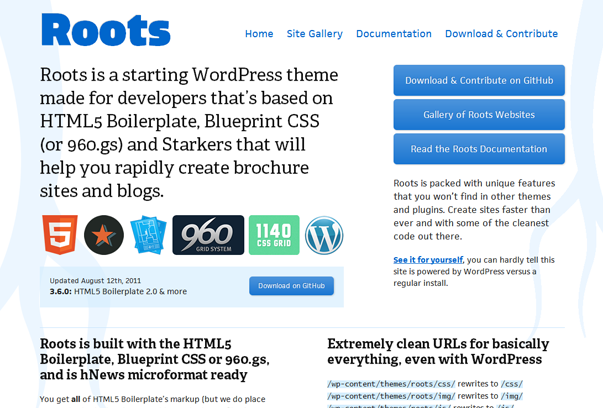
Roots HTML5 WordPress Theme FrameWork � FREE

It make to able to put less effort and get more out of it because you get most of the code in the ready form.


Roots HTML5


Foundation WordPress Theme FrameWork � FREE

It is a very powerful theme which provides many features to the blogger and is very flexible.

Foundation


Reverie Responsive WordPress Theme FrameWork � FREE

It is a good tool to use for search engine optimization and it makes the content more visible to the reader. 


Reverie Responsive


Skeleton Responsive WordPress Theme FrameWork � FREE

It facilitates the reader by allowing him to view the website on many devices like desktop computers, smart phones and tablets.


Skeleton Responsive


Bones WordPress Theme FrameWork � FREE

The main focus of this framework is on the details. It allows the viewer to view every detail of the website.


Bones


WP Paintbrush WordPress Theme FrameWorks � FREE

It is actualy designed for beginners as it allows to create a theme immediately.


WP Paintbrush

Featureso Friday, 16 November 2012